
Vista Order Editing app for Shopify stores has just launched a powerful refund management feature that lets Shopify merchants choose how customers receive their order cancellation refunds: either back to their original payment method or as store credit.
This feature, available exclusively for stores using Shopify’s new customer accounts, gives merchants complete control through admin settings to decide refund options, potentially saving significant money on transaction fees while improving customer retention.
The Hidden Cost of Order Cancellations Nobody Talks About
When a customer cancels an order, most merchants focus on the lost sale. But in some cases, there’s another cost quietly eating into your profits: transaction fees.
Here’s what happens with traditional refunds at one of the Indian e-commerce stores.
They bear a transaction fee when the customer originally placed their order. It is 2% through a payment gateway like Razorpay in India, or similar rates with other payment gateways like Stripe or PayPal globally. When you refund that order to the original payment method, you’re processing another transaction and paying those fees all over again.
The math is eating into your profits. On a ₹10,000 order with a 2% transaction fee, you paid ₹200 when the customer checked out. When they cancel the order, and you refund them, you will have to absorb the transaction fee again if they decide to place an order again.
Store Credits: The Smart Alternative
This is where Vista Order Editing’s new refund feature becomes a game-changer. With store credits, the refund amount simply becomes credit in the customer’s account that they can use for the next order. No payment gateway involvement means no transaction fees. That ₹200 (or $2.50 on a $125 order, or £1.50 on a £75 order) stays in your pocket.
But the benefits go beyond just saving fees:
Customer retention shoots up. When someone has store credit, they’re coming back. It’s psychology and practicality combined. They have already got money sitting in your store, ready to spend.
You maintain cash flow. The money never leaves your business. Instead of refunding cash that exits your account, you’re keeping that capital working for you.
Reduced churn on subscription products. If you sell consumables or have repeat customers, store credits turn a cancellation into a delayed sale rather than a lost customer.
How the Feature Works (It’s Simpler Than You Think)
Vista Order Editing app puts you in complete control. In your admin settings, you can:
- Allow only original payment method refunds.
- Allow only store credit refunds.
- Give customers the choice between both options
Important note: This feature works with Shopify’s new customer account system. If your store is still on legacy customer accounts, you’ll need to migrate to access store credit refunds. (Shopify has made this migration straightforward, and it comes with other benefits too.)
Setting It Up in Vista Order Editing App
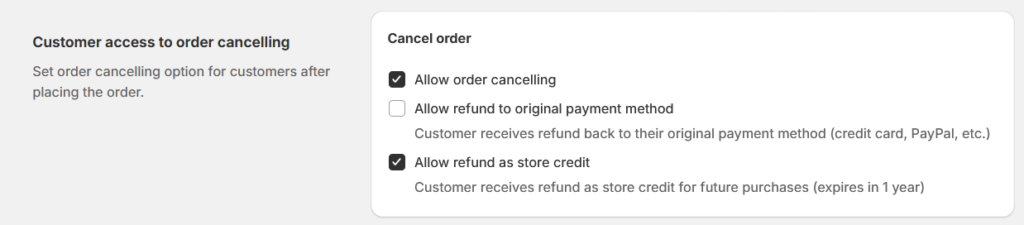
The implementation is straightforward.
Navigate to your Vista Order Editing admin panel.
- Go to settings.
- Under cancellation settings, you will see three radio buttons for your refund policy.
- Choose your preferred option based on your business model.
For stores with high repeat purchase rates (coffee subscriptions, beauty products, pet supplies), you might even consider defaulting to store credits with an option to request original payment method refunds through customer support.
Who Should Use This Feature?
This feature isn’t one-size-fits-all, but it’s particularly powerful for:
- Fashion and apparel stores with higher return rates.
- Speciality food and beverage shops with repeat customers.
- Beauty and cosmetics retailers with a loyal following.
- Home goods stores where customers make periodic purchases.
- Any business using payment gateways with 2%+ transaction fees
If your business model involves one-time big-ticket purchases with low repeat rates (like furniture or electronics), store credit might be less effective. But you can still offer the option and let customer behavior guide your decisions.
The Transaction Fee Landscape in India
For Indian merchants, this feature hits particularly hard because payment gateway fees in India are among the factors significantly impacting margins.
Razorpay charges around 2% for most transactions. Paytm is similar. Even UPI, while cheaper for smaller amounts, adds up. When you’re operating on thin margins—common in competitive e-commerce categories—every percentage point matters.
International payment gateways like PayPal can charge even more, sometimes 3-4% for cross-border transactions. If you’re selling to customers outside India, those fees compound quickly.
Conclusion
If you’re already using Vista Order Editing, enable this feature in your admin settings today. If you’re not yet using the app, refund functionality is just one of many features that give you granular control over the post-purchase experience.
About Vista Order Editing: A comprehensive Shopify app that empowers customers to edit their orders post-purchase: Adding/changing products and variants, quantities, shipping addresses, and now managing refund preferences, while giving merchants complete control over the editing process through customizable settings.
3 thoughts on “How to Refund to Store Credit on Order Cancellation?”
Comments are closed.