
Choosing between WooCommerce and Shopify is one of the first big decisions any small business owner makes when building an online store — and it's a decision that shapes your costs, your workload, and your growth options for years afterward. Both platforms are genuinely excellent, and both power millions of live stores today, so there is no universally “correct” answer. The right choice depends on your budget, technical comfort, and how much control you want over your store's backend.
This comparison draws on official platform documentation, independent field-performance data (CrUX-based speed benchmarks), and hundreds of verified merchant reviews on Capterra and G2, not just feature lists, to show where each platform genuinely wins, where its marketing oversells it, and where the honest trade-offs are. At Growthpolis, we've helped ecommerce clients evaluate and migrate between both platforms, and the pain points below reflect what merchants actually run into, not just what each platform's sales page claims.
Quick Comparison at a Glance
| Factor | Shopify | WooCommerce |
|---|---|---|
| Best for | Merchants who want a managed, all-in-one solution | Merchants who want full control and already use (or want) WordPress |
| Starting price | $29/month (billed annually) | Free plugin; realistic total cost $200–$1,500+/year |
| Hosting | Included | Purchased separately |
| Transaction fees | 2% down to 0.2% if you skip Shopify Payments; none with Shopify Payments | None from WooCommerce itself; only your gateway's standard rate |
| Customization | Theme-based, Liquid templating, apps; checkout customization largely locked to Plus tier | Full code-level access, any WordPress theme/plugin, no plan-based feature walls |
| Out-of-box mobile speed (field data) | Median LCP ~2.1–2.6s, ~58–68% Core Web Vitals pass rate | Highly variable: 1.8s (managed hosting) to 5.8s+ (shared hosting), out-of-box |
| SEO | Strong built-in basics | Deeper control via Yoast/Rank Math |
| Support | 24/7 official support on every plan | Community, hosts, and third-party developers |
| Market position (July 2026) | Used by 5.2% of all websites (7.5% of CMS market share) — W3Techs | Used by 8.2% of all websites (11.7% of CMS market share) — W3Techs |
Overall User Experience
Ease of Use for Beginners
Shopify was built as a hosted, all-in-one platform, and it shows the moment you log in. You pick a theme, add products, connect a payment method, and you're selling — often within a single afternoon. There's no server to configure, no software to update, and no separate hosting account to manage, because Shopify bundles all of that into your monthly subscription.
WooCommerce takes a different starting point. It's a free plugin that turns a WordPress website into a store, which means you first need a WordPress site, a hosting account, and a domain before WooCommerce even enters the picture. None of these steps are especially hard individually, but stacked together they create a noticeably steeper on-ramp for someone who has never touched WordPress before.
Intuitive Setup Process
Shopify's setup wizard walks you through store details, shipping zones, tax settings, and payment configuration in a guided sequence, and its newer AI assistant, Sidekick, can generate storefront copy and handle routine setup tasks on request. WooCommerce's setup wizard covers the same basic ground: store location, currency, shipping, and payments, but afterward you're managing the plugin, your theme, and WordPress core as three separate moving parts rather than one unified system.
Learning Curve for Advanced Features
This is where the comparison flips somewhat. Shopify is easier to start with, but its deeper customization options (custom checkout logic, complex automations, headless storefronts) require developer skills, Shopify's Liquid templating language, or paid apps. WooCommerce has a steeper initial curve but rewards that investment with more built-in flexibility once you understand WordPress — you own the code, the database, and the server, so there's rarely a wall you hit that can't be solved with a plugin, a custom function, or a developer.
What merchants actually report: In verified Capterra reviews, WooCommerce users repeatedly describe the platform as “not for the faint-hearted” — free at the outset, but requiring continued time investment to manage settings, plugin conflicts, and updates as the store matures. A recurring theme in reviews from developers and agencies is that WooCommerce depends heavily on third-party plugins, which some reviewers flag as a source of site fragility when plugins are added, removed, or fall out of date. Shopify reviewers, by contrast, consistently rate ease of use highly (Capterra's aggregate score sits around 4.5/5 on this dimension), with the more common complaints centering on cost creep rather than usability — see the Pricing section below.
Customization Capabilities
Design Flexibility
WooCommerce holds a clear edge here. Because it runs on WordPress, you can pair it with virtually any WordPress theme, page builder (Elementor, Divi, the native WordPress block editor), or custom-coded template. You have full access to the underlying PHP, CSS, and database, so there is effectively no ceiling on how far you can customize the storefront.
Shopify's design system is theme-based and uses its proprietary Liquid templating language. Shopify's Theme Store offers a curated, professionally built selection, and the newer AI-assisted theme editor makes visual changes faster than ever, but big structural changes still typically require a Shopify developer or an app, since merchants can't touch the server-side code the way they can with a self-hosted WordPress install.
Theme and Plugin Availability
WordPress' enormous ecosystem is the practical reason WooCommerce customization runs so deep. WordPress.org alone lists tens of thousands of free plugins, and marketplaces like ThemeForest carry a huge library of WooCommerce-compatible themes far more raw volume than Shopify's app and theme stores combined, even though Shopify's own app store has grown into an ecosystem with thousands of dedicated commerce apps (covering everything from checkout customization to order editing and rules engines).
Tailoring for Specific Business Needs
For a niche business model — a subscription box, a multi-vendor marketplace, a highly specific B2B catalog WooCommerce's open-source nature generally makes bespoke logic cheaper to build, because a developer can modify the core behavior directly. Shopify handles most of these same use cases well through apps and, on paid tiers, Shopify Functions, but you're customizing within Shopify's defined extension points rather than editing the platform itself.
The specific wall merchants hit — and the actual workaround: One of the most consistently reported Shopify limitations in verified reviews is checkout customization. Shopify locks core checkout behavior (custom fields, custom logic, upsell placement) behind Shopify Plus, which starts around $2,300/month, a jump multiple reviewers describe as disproportionate to the value gained versus what standard plans already offer.
Merchants on Basic, Grow, or Advanced who need checkout changes generally have three real options: use a checkout-extension app (limited to Shopify's defined extension points, so not every change is possible), upgrade to Plus, or in some cases work around it using Shopify Functions where the plan tier allows it. There is no native “just edit the checkout page” option below Plus, which is a structural platform decision, not a bug.
WooCommerce has no equivalent tier-based wall; checkout customization is a matter of plugin choice and developer time, not subscription level, but the trade-off is that a poorly coded checkout plugin can itself introduce conflicts, which is the flip side of that same openness.
Pricing and Value
Cost for Small and Large Stores
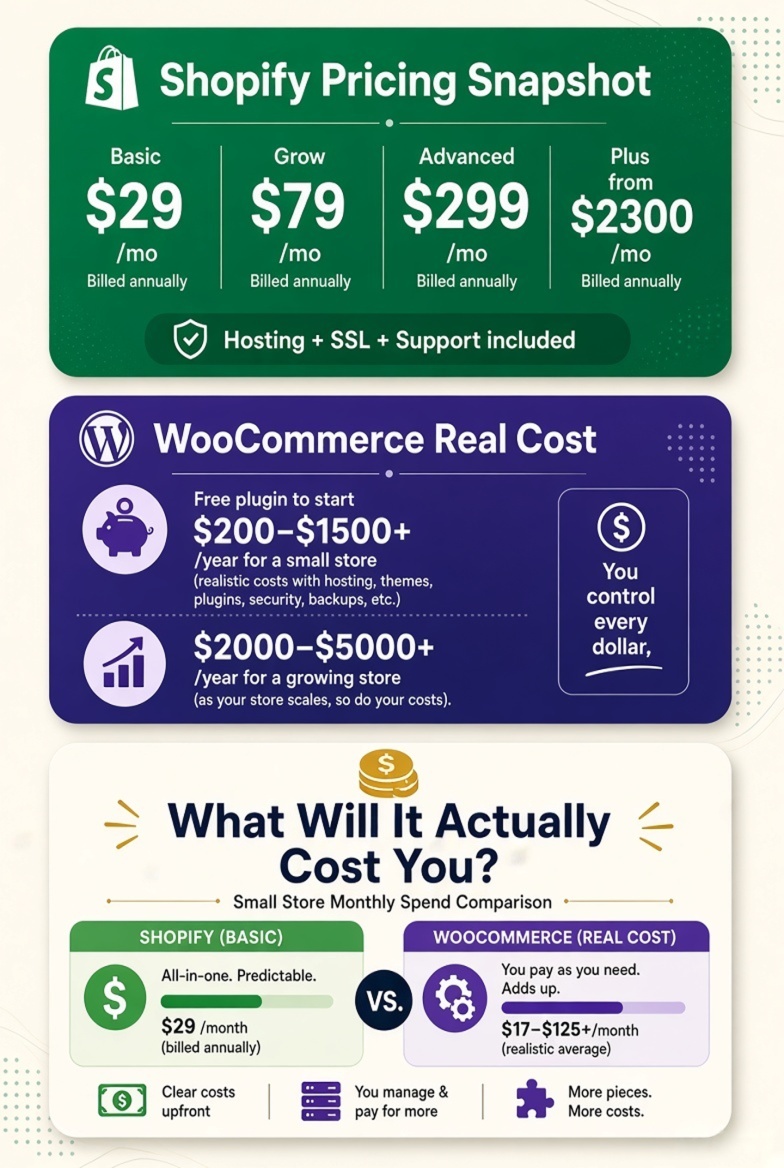
As of 2026, Shopify's published plans are:
- Basic — $39/month billed monthly, or $29/month billed annually — aimed at solo entrepreneurs
- Grow — $79/month billed annually ($105/month billed monthly) — for small teams
- Advanced — $299/month annually ($399/month monthly) — for stores selling internationally at scale
- Plus — starting at $2,300/month — for high-volume, complex businesses
Every Shopify plan includes hosting, an SSL certificate, checkout, and 24/7 support, so the monthly fee is close to your full baseline cost, plus transaction fees.
WooCommerce itself costs nothing to install, but a “free” WooCommerce store still needs hosting, a domain, a theme, and usually a handful of paid plugins. Realistic annual costs for a small, functional store generally land somewhere between $200 and $1,500 in year one, depending on whether you choose budget shared hosting or WooCommerce-optimized managed hosting (which typically runs $20–$50+ per month). Larger stores with premium themes, advanced plugins, and email marketing tools commonly spend $2,000–$5,000+ per year, and custom enterprise builds can run well into five figures.
To put this in concrete terms: a solo entrepreneur selling 20–30 products with modest traffic might spend roughly $40–$60/month all-in on Shopify Basic once card fees are factored in, versus perhaps $25–$40/month on WooCommerce with budget-friendly managed hosting and a couple of essential paid plugins. As the store grows into hundreds of products, staff logins, and higher order volume, the gap narrows — a mid-size WooCommerce store with premium plugins, a quality theme, and managed hosting commonly lands close to what a Shopify Grow or Advanced plan costs once transaction fees are included.
Open Source Benefits of WooCommerce
Because WooCommerce is open source, there's no licensing fee tying you to a single vendor, and you can move your store to a different host at any time without migrating platforms. This also means costs scale with your choices rather than a fixed subscription: a lean store can genuinely run cheaply, while a feature-rich store will cost proportionally more in premium plugins and developer time.
Subscription Models and Hidden Fees
Shopify's highest hidden cost for many merchants is the transaction fee charged when you don't use Shopify Payments: 2% on Basic, dropping to 1% on Grow, 0.6% on Advanced, and 0.2% on Plus. Using Shopify Payments removes this extra fee, leaving you with just the standard card rate (starting at 2.9% + 30¢ on Basic, improving to 2.5% + 30¢ on Advanced).
WooCommerce charges no platform-level transaction fee at all — you only pay your chosen payment gateway's rate. WooCommerce's own gateway, WooPayments, charges 2.9% + $0.30 for domestic US cards (with a 1.5% surcharge on international cards), which is comparable to Shopify Payments' base rate but without an added platform cut. The trade-off is that WooCommerce's “hidden fees” show up as plugin renewals, premium theme licenses, and hosting upgrades instead of a percentage on every sale.
What merchants actually report: The single most repeated complaint in verified Shopify reviews across Capterra isn't the base subscription — it's what several reviewers independently describe as “app creep”: costs that quietly compound as features that feel like they should be native (advanced reporting, certain automations, loyalty tools) turn out to require paid apps stacked on top of the subscription and transaction fees. One reviewer summarized it as feeling like additional fees are taken from every direction — the platform fee, the payment fee, and the app fee simultaneously. On the WooCommerce side, the equivalent complaint is less about stacking fees and more about baseline gaps: several reviewers note that out-of-the-box WooCommerce ships without meaningful inventory management, default UPC/barcode support, or usable coupon and shipping configuration, meaning “free” software still requires several paid extensions before it matches what a mid-tier Shopify plan includes on day one — one reviewer cited an extra ~$800 in add-on costs to reach feature parity for their use case.
Performance and Speed
Page Load Speed Comparison
Independent field-data benchmarks (based on Google's Chrome UX Report, the same real-user dataset Google uses for Core Web Vitals ranking signals) consistently show Shopify outperforming an unoptimized WooCommerce install. Out-of-the-box, Shopify's Dawn theme typically scores around 65–72 on mobile PageSpeed with a median Largest Contentful Paint (LCP) near 2.1–2.6 seconds and a Core Web Vitals pass rate in the 58–68% range. A default WooCommerce install on budget shared hosting scores meaningfully lower — commonly in the 35–55 mobile PageSpeed range with LCP as high as 5–6 seconds, driven mainly by slow server response time (TTFB) rather than the software itself.
That gap narrows substantially with the right setup. WooCommerce stores on quality managed hosting (e.g., Cloudways-tier infrastructure) with proper caching regularly bring LCP down to the 1.8–3.4 second range — in some benchmark sets, a well-optimized WooCommerce store even edges out Shopify's median field LCP, because WooCommerce's ceiling for a hand-tuned setup is higher than Shopify's more uniform, capped infrastructure. The honest takeaway: Shopify is faster by default with zero effort, while WooCommerce has a wider performance range that depends heavily on hosting quality, theme choice, and how disciplined you are about plugins — the same flexibility that helps customization can hurt speed if left unmanaged.
Server Performance and Scalability
Shopify automatically handles server scaling, including traffic spikes during flash sales or Black Friday, since it's a fully managed, multi-tenant cloud platform. WooCommerce store owners are responsible for provisioning enough server capacity themselves — during high-traffic events, an under-resourced WooCommerce host can slow down or even crash, whereas Shopify's infrastructure is built to absorb sudden surges without merchant intervention.
Impact on Customer Experience
Page speed directly affects conversion rates and Core Web Vitals scores (LCP, INP, CLS), which in turn affect both user experience and Google's ranking signals — Google's December 2025 core update specifically increased the ranking weight of Core Web Vitals, and sites with poor interaction responsiveness (INP above 300ms) saw measurable organic traffic drops afterward. Shopify's managed approach removes one variable from the equation, which is valuable for merchants without a developer on call. WooCommerce rewards technical diligence — proper caching plugins (like LiteSpeed Cache), image optimization, and a lean plugin stack can produce excellent results, but it takes ongoing attention rather than being handled automatically.
SEO Features and Capabilities
Built-in SEO Tools in Shopify
Shopify includes solid SEO fundamentals out of the box: automatically generated sitemaps, editable title tags and meta descriptions, canonical tags, and alt text fields for images. Shopify also auto-generates robots.txt and handles most technical SEO housekeeping without merchant intervention, which is a real advantage for non-technical store owners.
Technical SEO Adjustments in WooCommerce
WooCommerce, running on WordPress, gives you far more granular control over technical SEO — URL structures, schema markup, redirect management, and content architecture can all be adjusted directly, since you have full access to the site's code and database. This flexibility particularly benefits stores that also publish a lot of blog or resource content alongside product pages, since WordPress' content tools are more mature than Shopify's blogging features.
Effectiveness of Plugins and Add-ons
WooCommerce's SEO plugin ecosystem — led by Yoast SEO and Rank Math — is considered by many SEO practitioners to be more powerful than Shopify's native tools or its third-party SEO apps, offering detailed content analysis, schema control, and internal linking suggestions. Shopify merchants can achieve comparable results using SEO apps from the App Store, but the depth of free, mature SEO tooling in the WordPress ecosystem is hard for any hosted platform to fully replicate. In practice, both platforms can rank well in Google when properly optimized; the difference is how much manual configuration versus plugin-assisted automation you're willing to do.
One structural distinction worth noting: Shopify's URL structure for products and collections has historically been less flexible than WordPress's, since certain path segments (like /products/ or /collections/) are largely fixed by the platform. WooCommerce, by contrast, lets you fully control your permalink structure. For most stores this difference has a modest practical SEO impact, but content-heavy merchants who want tight control over URL architecture, category hierarchies, and blog-to-product internal linking often find WordPress's flexibility easier to work with at scale.
Integration with Other Tools
Payment Gateway Flexibility
WooCommerce supports essentially any payment gateway with a WordPress plugin available, including Stripe, PayPal, and WooPayments, with no platform-level fee for choosing a non-default processor. Shopify supports Shopify Payments (built on Stripe) plus over 100 third-party gateway options — but as covered above, using a non-Shopify gateway triggers an added transaction fee unless you're on a Plus plan with a negotiated rate.
Compatibility with Business Tools
Both platforms connect to the major marketing, accounting, and fulfillment tools merchants rely on — Google Analytics, Google Shopping, Klaviyo, QuickBooks, and shipping carriers all have solid integrations on either side. Shopify Flow (available on higher plans) offers built-in workflow automation, while WooCommerce merchants typically rely on Zapier or dedicated automation plugins to achieve similar results.
API and Third-party App Integration
Shopify's API is well documented, heavily used by developers, and central to how apps like order editing tools, checkout customization apps, and inventory managers extend the platform. WooCommerce, being built on WordPress' REST API, is equally extensible, and because it's open source, developers can go beyond the API entirely and modify core behavior directly when a business need calls for it — something Shopify's more sandboxed environment doesn't allow outside of Shopify Functions on Plus-tier plans.
Security Measures
Data Protection Standards
Shopify manages security centrally: every store on the platform inherits the same infrastructure-level protections, PCI compliance, and regular security patching without any action from the merchant. WooCommerce security is a shared responsibility — WordPress core, WooCommerce itself, your theme, and every plugin you install are all potential points of vulnerability, and keeping all of them updated is on you (or your host/developer).
Both platforms can be configured to meet GDPR requirements for stores selling into the EU, including cookie consent, data export, and data deletion tools. Shopify includes GDPR-relevant customer data tools natively; WooCommerce merchants typically add a dedicated GDPR/cookie-consent plugin alongside WordPress's built-in data export and erasure tools. Neither approach is inherently more compliant — the difference is again whether the work is bundled in or added separately.
SSL and Security Certificates
Every Shopify plan includes a free SSL certificate automatically applied to your store and custom domain. WooCommerce stores need SSL configured through their hosting provider — most quality hosts now include free SSL via Let's Encrypt by default, so this gap has narrowed significantly in recent years, but it's still an extra setup step rather than something that's simply on by default.
Handling Payments Safely
Shopify is a certified Level 1 PCI DSS-compliant platform-wide, and stores built on it inherit that compliance automatically. WooCommerce stores using reputable, PCI-compliant gateways like WooPayments or Stripe also meet PCI DSS requirements for how card data is handled, but achieving full compliance depends partly on how the merchant's specific site and plugins are configured — it's not automatically bundled the way it is on Shopify.
Support and Community
Customer Support Services
Shopify offers 24/7 support across all plans, ranging from live chat on Basic and Grow to enhanced support on Advanced and priority phone support on Plus. This centralized support model means there's always an official channel to reach when something breaks — though it's worth noting that a subset of reviewers describe response consistency as variable depending on the complexity of the issue.
WooCommerce doesn't have a single support line, because WooCommerce (the plugin) is free and open source. Automattic, the company behind WooCommerce, offers support for its own paid products (like WooPayments) through a help center, but general store troubleshooting typically comes from your hosting provider, a freelance WordPress developer, or a managed WooCommerce agency.
Support for Troubleshooting
Shopify's single-vendor model means troubleshooting is usually straightforward: one company, one support channel, one dashboard. WooCommerce troubleshooting can be more involved because problems can originate in WordPress core, the WooCommerce plugin, your theme, or any of your installed plugins — which is why many growing WooCommerce stores eventually hire a managed WooCommerce maintenance service to handle updates, conflicts, and performance issues proactively.
Community Resources and Forums
Both ecosystems have large, active communities. Shopify has an official community forum, an extensive Help Center, and a large partner directory of certified experts. WooCommerce benefits from the broader WordPress community — one of the largest open-source communities on the web, powering over 40% of all websites globally — plus WooCommerce-specific forums, developer documentation, and thousands of freelancers and agencies (including WooCommerce-focused shops) who specialize in the platform.
The practical trade-off is cost versus control: Shopify's support is included in your subscription regardless of plan, while WooCommerce support is something you typically budget for separately, whether that's a one-off freelancer for a specific bug or an ongoing managed WooCommerce maintenance retainer for a growing store. For businesses without any in-house technical resource, this is often the deciding factor between the two platforms.
Long-term Scalability
Adapting to Business Growth
Shopify scales by moving you up a tier — Basic to Grow to Advanced to Plus — with each step unlocking more staff accounts, better transaction rates, and more advanced features, all without touching your infrastructure. WooCommerce scales by upgrading your hosting, adding caching and optimization, and sometimes re-architecting parts of your stack (like moving to a headless setup) as your catalog and traffic grow — which offers more control but requires more hands-on management.
Managing High Traffic Volume
For merchants who expect unpredictable or seasonal traffic spikes (a single viral product, a major sale event), Shopify's managed, multi-tenant infrastructure is built to absorb that load without merchant intervention. WooCommerce can absolutely handle high traffic, but it requires provisioning adequate hosting (managed WooCommerce hosts, dedicated servers, or cloud infrastructure with autoscaling) ahead of time rather than relying on the platform to handle it automatically.
Future-proofing Your Online Store
Shopify Plus is explicitly built for enterprises that have outgrown standard plans, offering unlimited staff accounts, custom checkout, and higher API limits. WooCommerce's future-proofing comes from its flexibility and ownership model — since you control the code and data outright, there's no ceiling imposed by a vendor's roadmap, though that also means the responsibility for scaling well sits with you or your development team rather than a single platform provider.
It's also worth considering exit costs when thinking long-term. Because WooCommerce data lives in your own WordPress database, you technically own your store's data outright and can migrate hosts, themes, or even away from WooCommerce entirely without asking permission from a vendor. Shopify data can also be exported, and official migration tools exist in both directions, but your store's day-to-day operation remains dependent on Shopify's platform for as long as you're on it — a dependency several long-term Shopify reviewers specifically flag as making an eventual platform switch harder than they expected going in. Neither model is wrong — it's simply a question of whether you value platform-managed convenience or underlying ownership more highly as your business matures.
Shopify or WooCommerce: Which One Should You Choose?
There isn't a single winner. The right platform depends on what you're optimizing for.
Choose Shopify if you want to launch quickly, prefer predictable monthly costs, don't want to manage hosting or security yourself, and value having one company responsible for uptime, updates, and support. Go in expecting that “predictable” cost to grow with app usage — budget for that upfront rather than being surprised by it later.
Choose WooCommerce if you already have (or want) a WordPress-based content strategy, want maximum control over design and functionality, are comfortable managing hosting and plugin updates (or hiring someone who is), and want to avoid a platform-level cut on every transaction. Go in expecting to invest in quality managed hosting and a lean, well-vetted plugin stack — the platforms that perform worst in speed benchmarks are almost always running on budget shared hosting with an unmanaged plugin count.
Frequently Asked Questions
Is Shopify or WooCommerce better for SEO?
Both can rank well. Shopify handles core technical SEO automatically, which suits merchants who want less manual work. WooCommerce, through plugins like Yoast SEO and Rank Math, offers deeper manual control and generally stronger content-marketing tools, which suits merchants running an active blog or content strategy alongside their store.
Is WooCommerce still relevant in 2026?
Yes. WooCommerce remains one of the most widely used ecommerce systems in the world by store count, and it continues to see steady plugin downloads and active development from Automattic, even as the market has matured and growth has leveled off compared to its peak years.
Is Shopify or WooCommerce better for beginners?
Shopify is generally easier for beginners, since it bundles hosting, security, and setup into a single guided experience with no separate technical accounts to manage.
Is Shopify better than WooCommerce for mobile commerce?
Shopify's themes are responsive by default, and its checkout is heavily optimized for mobile conversion, and it currently posts a higher out-of-the-box mobile Core Web Vitals pass rate in independent field-data benchmarks. WooCommerce can match or exceed that on quality managed hosting, but consistency depends much more on your specific setup rather than being guaranteed by default.
Can I migrate from WooCommerce to Shopify?
Yes, Shopify and WooCommerce both publish official migration guides, and third-party migration tools and agencies can transfer products, customers, and order history between the two platforms.
Is it worth moving from WooCommerce to Shopify?
It depends on your priorities. Merchants moving to Shopify usually do so for less hands-on maintenance, more predictable costs, and stronger built-in scalability during traffic spikes. Merchants moving the other way usually want more design control, lower long-term transaction costs, or a tighter connection to an existing WordPress content strategy.
Is Shopify or WooCommerce better for dropshipping?
Both support dropshipping well through dedicated apps and plugins. Shopify's app ecosystem for dropshipping (Oberlo-era tools, DSers, and similar apps) is generally considered more streamlined for beginners, while WooCommerce offers more flexibility for merchants who want to customize supplier workflows directly.
Which is better, WordPress or Shopify?
This compares a general-purpose CMS (WordPress, with WooCommerce added for e-commerce) to a dedicated commerce platform (Shopify). For a store that's primarily transactional, Shopify's focus is an advantage. For a business built around content, community, or a hybrid blog-plus-store model, WordPress's broader flexibility often wins out.
How much does WooCommerce cost?
The plugin itself is free, but a functioning store typically costs $200–$1,500+ per year for a small store (hosting, domain, theme, essential plugins), rising to $2,000–$5,000+ per year for stores with premium plugins, managed hosting, and marketing tools.
Who is Shopify's biggest competitor?
WooCommerce is generally considered Shopify's largest competitor by total store count, with BigCommerce, Wix eCommerce, Squarespace, and Adobe Commerce (Magento) rounding out the rest of the field, particularly at the mid-market and enterprise level.
Still not sure which platform fits your business? Growthpolis works with small and mid-sized businesses across Pune and Mumbai to evaluate, set up, and optimize ecommerce stores on both Shopify and WooCommerce — from initial platform selection through to SEO, performance tuning, and ongoing growth marketing. Reach out to [email protected] to talk through your specific setup.
Sources & Further Reading
- Shopify Pricing — official plan pricing and transaction fee tiers: shopify.com/pricing
- WooCommerce / WooPayments Fee Documentation — official gateway rates: woocommerce.com/document/woopayments/fees
- W3Techs — WooCommerce vs. Shopify Usage Statistics (independent, daily-updated): w3techs.com/technologies/comparison/cm-shopify,cm-woocommerce
- BuiltWith — Shopify and WooCommerce Technology Trends: trends.builtwith.com/shop/Shopify / trends.builtwith.com/shop/WooCommerce
- WordPress.org — official plugin directory and ecosystem data: wordpress.org
- PCI Security Standards Council — PCI DSS compliance reference: pcisecuritystandards.org
- Capterra — Verified Shopify user reviews (cost, customization, and support feedback referenced above): capterra.com/p/83891/Shopify/reviews
- Capterra — Verified WooCommerce user reviews (plugin dependency, learning curve, and add-on cost feedback referenced above): capterra.com/p/225601/WooCommerce/reviews
3 thoughts on “WooCommerce vs Shopify: A 2026 Comparison for Small Businesses”
Comments are closed.