
By Navdeep Soni, SEO consultant and Shopify app developer. Disclosure: I build Vista Bundles, whose discount allocation is described in the middle of this article. The refund maths applies to any bundle setup.
How do you refund one item from a discounted bundle on Shopify?
Short answer: Refund what the customer actually paid for that item, which is its price minus its share of the bundle discount. The share is the item's portion of the bundle's total value, so a $48 item in a $110 bundle with a $22 discount carries $9.60 of the discount and is refunded at $38.40. Refunding the full $48 over-refunds, and refunding one third of the bundle total under-refunds. Both are common mistakes.
The rest of this guide walks through the maths, a rounding trap that changes refunds by a cent, and how to choose a bundle display that keeps returns simple.
Why does the split matter at all?
A bundle is sold at one price, but a return is seldom the whole bundle. Someone sends back the moisturiser and keeps the cleanser and serum. Your accounting, your payment processor, and the customer all need one number: how much of the bundle price belonged to that item?
Shopify records discounts against individual order line items, and its refund calculation works from those line-level amounts. That means the way a bundle discount is divided across items at purchase time decides the refund numbers later. If the split is arbitrary, the refund is arbitrary.
How should a bundle discount be divided across items?
There are three ways people do it. Only one holds up when items cost different amounts.
1. Equal split. Divide the discount by the number of items. Simple, but it gives a cheap item and an expensive item the same dollar discount, so the cheap one ends up discounted far more in percentage terms.
2. Per-item discounting. Apply the percentage to each item separately. For a percentage discount, this gives the same result as option 3. It breaks down with fixed-amount discounts, because there is no single percentage to apply.
3. Proportional allocation. Share the discount in proportion to each item's extended price (unit price × quantity). This works for percentage and fixed-amount discounts, and it never gives one item a deeper discount than another in relative terms.
What does it look like with real numbers?
Illustrative skincare starter set, one of each item. Taxes and shipping are left out to keep the maths readable.
| Item | Price | Share of bundle | 20% bundle discount | Customer paid |
|---|---|---|---|---|
| Cleanser | $24.00 | 21.8% | $4.80 | $19.20 |
| Serum | $48.00 | 43.6% | $9.60 | $38.40 |
| Moisturiser | $38.00 | 34.5% | $7.60 | $30.40 |
| Bundle | $110.00 | 100% | $22.00 | $88.00 |
Now the customer returns the serum. Here is what each approach would refund:
| Method | Refund for the serum | Result |
|---|---|---|
| Full item price | $48.00 | Over-refunds by $9.60 |
| One third of the bundle total ($88 ÷ 3) | $29.33 | Under-refunds by $9.07 |
| Equal split of the discount ($22 ÷ 3 = $7.33) | $40.67 | Over-refunds by $2.27 |
| Proportional allocation | $38.40 | Matches what was paid |
Quantities work the same way. If a bundle contains two cleansers ($24 each) and one serum ($48) at 20% off, the extended prices are $48 and $48, so the $19.20 discount splits $9.60 each. Returning one cleanser refunds $24.00 minus half of the cleanser line's share ($4.80), which is $19.20.
Why do fixed-amount discounts and rounding cause cent differences?
Percentage discounts are tidy. Fixed-amount discounts create fractions. Take the same set with $10.00 off the bundle:
| Item | Exact share of $10 | Rounded to cents |
|---|---|---|
| Cleanser | $2.1818 | $2.18 |
| Serum | $4.3636 | $4.36 |
| Moisturiser | $3.4545 | $3.45 |
| Total | $10.0000 | $9.99 |
Rounding each share separately leaves the allocations one cent short of the real discount. Someone has to absorb that cent, and a well-built system assigns it deliberately so the order total still adds up.
A common method gives the extra cent to the line whose exact share had the largest fractional part, here the moisturiser at $3.46. The consequence for refunds is small but real: the moisturiser's refund would be one cent lower than a naive calculation suggests. If your finance team reconciles refunds to the cent, you want a bundle setup where this rule is fixed and documented, not left to chance.
One more rule worth having: a fixed-amount bundle discount should never exceed the value of the items it applies to. Otherwise, a line could be discounted below zero, and refunds would go negative.
What should your returns policy say about bundles?
The maths above settles how much each item was paid for. It does not settle a business question: if a customer returns one item from a set, do they keep the bundle discount on the rest? Shopify does not decide that for you, and there are two reasonable policies:
- Item-level refunds (the default most stores follow): refund each returned item at what was paid for it and let the customer keep the rest at their discounted prices.
- Whole-bundle conditions: state in your policy that the discount applies only to the complete set, and re-price the remaining items if the set is broken.
If you choose the second, say so on the product page and in the returns policy before checkout. Changing the rules after the sale invites disputes. Also check how your chosen setup shows the order in the Shopify refund screen, because the refund amount Shopify suggests should be your starting point; you can refund less than that calculated amount, but any difference is then recorded as an adjustment in reporting.
Where does Vista Bundles fit?
Vista Bundles handles the allocation described above for fixed bundles (a set of products sold together at a bundle price):
- A percentage discount applies to the total eligible bundle value and is allocated across items in proportion to extended price (unit price × quantity), with rounding reconciled so the allocations add up.
- A fixed-amount discount is allocated the same way and never exceeds the eligible bundle value.
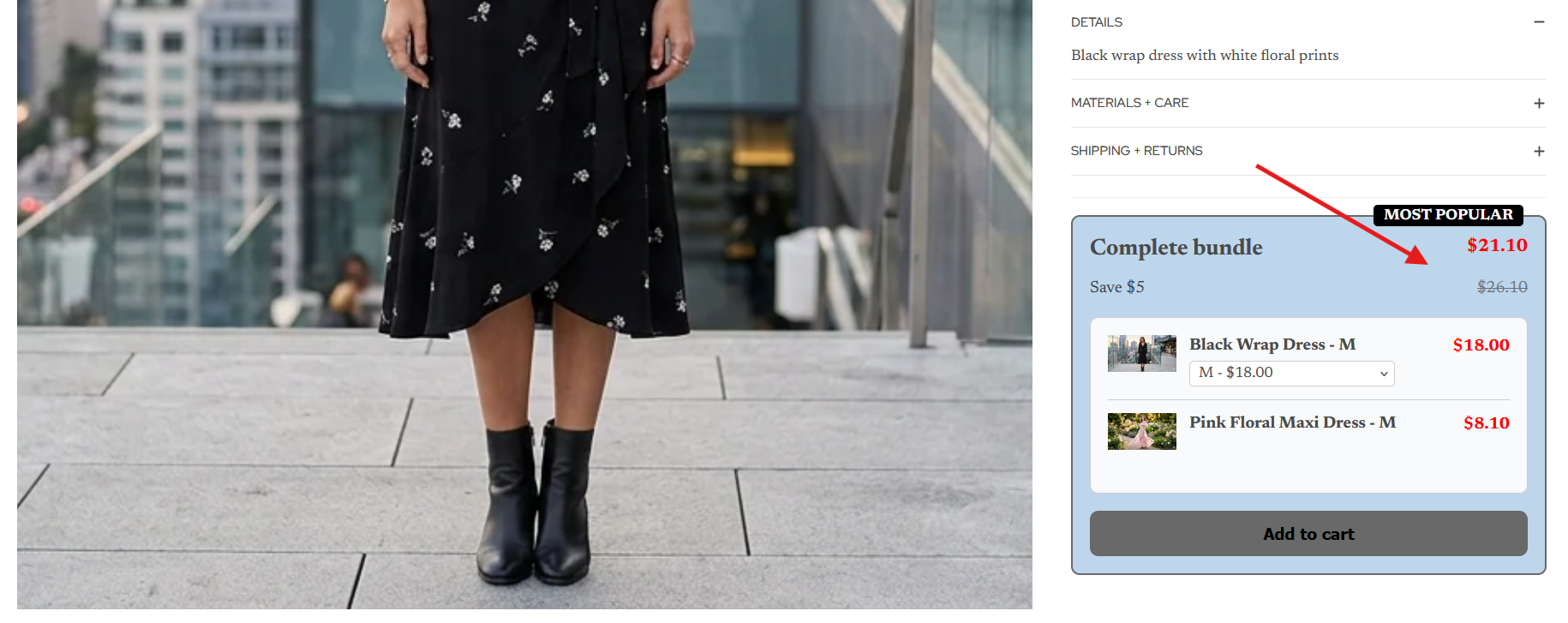
- The product page shows the regular (struck-through) bundle total, the discounted bundle total and the bundle-level savings. It deliberately does not show per-item discounted prices or per-item savings, which keeps the shopper's focus on the set and avoids implying a price for an item that is only discounted inside the bundle.
- Discounts are enforced at checkout through Shopify Cart Transform and Functions, as well as shown in the storefront, so what the shopper sees on the product page is what they pay.
- It installs as a theme app extension, so you do not edit theme code.
You can find it on the Shopify App Store. For the design reasoning behind showing totals rather than per-item prices, see How to show bundle savings on a product page the right way. If you are deciding between a set and a tier discount, see Quantity break vs. bundle discount.
FAQ
Does the customer get back the discount when they return one bundle item?
They get back what they paid for that item, which includes its share of the discount. Whether they keep the discount on the items they retain depends on your returns policy, so state it before checkout.
Why not just refund one-third of a three-item bundle?
Because the items rarely cost the same. A $48 serum and a $24 cleanser carry different shares of the bundle price, so an equal fraction refunds the wrong amount.
Do shipping and tax change the refund?
Yes. The examples above leave them out. Tax generally follows the discounted line amount, and shipping is refunded separately if you choose to. Check the figures with your accountant.
What if I refund less than Shopify calculates?
Shopify lets you refund less than the calculated amount, for example, to apply a restocking fee. Shopify records the difference as an adjustment, so your reports reflect it.
If you sell fixed bundles and want a clear discount split, see Vista Bundles on the Shopify App Store.