
Choosing between Shopify and WordPress is one of the first and most consequential decisions you'll make when starting an online business. Both platforms can power a professional, high-converting store, but they're built on fundamentally different philosophies: Shopify is a hosted, all-in-one ecommerce platform, while WordPress is an open-source content management system that becomes an ecommerce platform once you add WooCommerce.
Most comparison articles stop at a feature checklist: themes, plugins, pricing tiers. That's not enough to actually decide. Below, we go past the surface: what each platform technically won't let you do, why those limits exist, what real merchants report after using both, and how to work around the constraints that matter most.
The Core Architecture Difference
Shopify is a fully hosted (SaaS) platform you sign up, pick a plan, and get hosting, checkout, payment processing, and security handled for you. WordPress is free, self-hosted software that needs the WooCommerce plugin (or a similar tool) layered on top to sell anything. That single structural difference is the root cause of almost every other tradeoff in this comparison: who manages your servers, who patches security holes, and who's accountable when something breaks.
What Shopify Won't Let You Do And Why
This is the part most Shopify comparisons skip, and it's the part that actually matters once you're running a real store.
Checkout customization is capped below Shopify Plus
On standard plans (Basic, Shopify/Grow, Advanced), you can rebrand checkout — logo, colors, fonts, button styles but you cannot restructure the Information, Shipping, or Payment steps themselves. Custom fields, conditional logic, and upsells inside checkout require either a Plus subscription (which unlocks the Checkout Editor and Checkout Branding API) or a certified checkout-extension app working within Shopify's approved extension points.
The reason isn't arbitrary. Shopify's checkout was rebuilt around “Checkout Extensibility” which replaced the old checkout.liquid code-injection model. It was deprecated entirely for non-Plus stores by August 26, 2026. The old system let developers inject raw JavaScript directly into checkout, which became a genuine liability under PCI DSS v4's stricter rules on what scripts can touch payment data.
Prohibiting direct checkout alteration is a security tradeoff down to vetted extensions. It is not a missing feature. Shopify's own community team has confirmed the restriction exists specifically to limit exposure to bad actors, even when merchants push back on it.
Product variants are capped at 3 options per product
Even though Shopify raised the total variant count from 100 to 2,048 per product in late 2025, so a store selling, say, a jacket in 12 colors, 6 sizes, and 3 fabric weights (216 combinations) is fine on variant count — but can't add a 4th option like “monogram thread color” without restructuring the catalog or using a metafield/app workaround. This is a real ceiling for merchants with complex, highly configurable product lines.
Workarounds worth knowing, before assuming Plus is your only option: customize the cart page (which is fully editable on all plans) instead of checkout itself; use Shopify Functions for discount logic, shipping display, and payment method rules on non-Plus plans; and edit checkout copy/labels through the theme content editor even without structural changes.
What WooCommerce Won't Do Out of the Box and What You'll Need to Add
WordPress ecommerce content tends to undersell how much assembly is required. Pulled from verified merchant reviews on Capterra and G2, the pattern is consistent: WooCommerce is genuinely flexible, but very little works until you configure it.
Recurring, specific complaints from long-term WooCommerce users: shipping rules and coupon settings are essentially blank out of the box and need to be built from scratch; inventory management is minimal compared to Shopify's native tools and typically needs a dedicated plugin; and the platform gets noticeably heavier and slower as more plugins stack up, since each one adds its own database queries and script loads on a shared server stack.
One recurring line across multiple independent reviews: “you need a plugin for everything!” which is WooCommerce's core strength and its core cost center at the same time. On the flip side, developers and agencies consistently rate WooCommerce highly for exactly the same open-source flexibility, particularly its ability to be extended via custom PHP, multi-vendor setups, and non-retail use cases like bookings or memberships that don't fit Shopify's retail-first model at all.
What this means in practice: You will need to have a budget for a real plugin stack from day one: a caching plugin, an SEO plugin, a security plugin, a backup plugin, and a shipping/tax plugin are not optional extras; they're the minimum viable setup. Skipping any of them is how WooCommerce stores end up slow or vulnerable, not because the software is inherently worse, but because, unlike Shopify, nothing is configured safely by default.
Shopify Pricing Plans: What Each Platform Actually Costs
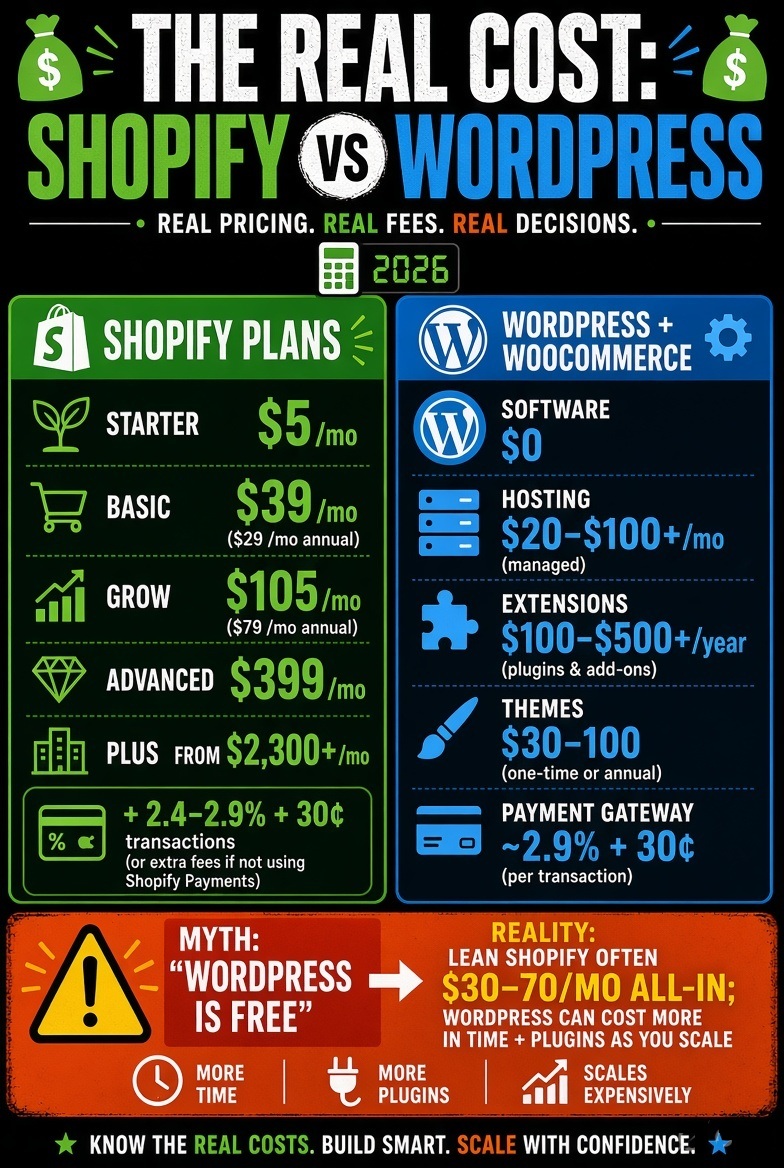
Shopify's current plans (monthly billing, US pricing):
- Starter – $5/month (checkout link only, no full storefront)
- Basic – $39/month ($29/month billed annually)
- Grow (formerly “Shopify”) – $105/month ($79/month billed annually)
- Advanced – $399/month ($299/month billed annually)
- Shopify Plus – from $2,300/month on a 3-year term, or $2,500/month on a 1-year term
Shopify Payments runs roughly 2.4%–2.9% + 30¢ per online transaction depending on plan tier. Route payments through a third-party gateway instead, and Shopify adds an extra 0.5–2% on top of that gateway's own rate — a cost that catches a surprising number of merchants off guard on their first statement.
WordPress.org software is free, but a working store still costs money: shared hosting starts around $3–$13/month, though anything beyond a hobby store needs managed WooCommerce hosting in the $20–$100+/month range for acceptable performance and security. WooCommerce itself is free to install, but functional stores typically need $100–$500+/year in paid extensions for shipping, subscriptions, or advanced payment handling, plus $30–$100 for a decent premium theme. Payment gateways (Stripe, WooPayments, PayPal) charge in the same 2.9% + 30¢ range as Shopify — WooCommerce doesn't add its own transaction fee, but it also doesn't reduce your gateway's.
Bottom line: a lean Shopify store runs $30–$70/month all-in at launch. A comparable WooCommerce store can be cheaper in year one, but developer time, plugin licensing, and security maintenance tend to close that gap, sometimes reverse it as the store scales.
Security: The Real Numbers Behind the Headlines
Sucuri's Hacked Website Report has found WordPress accounting for the large majority of infected CMS sites it cleans in recent years but that number is heavily correlated with WordPress's market share (it still powers roughly 41–42% of all websites, per W3Techs, down slightly from about 43% in late 2025) rather than being proof the software itself is weaker.
The more useful number: research from Patchstack and Wordfence consistently finds that 90%+ of WordPress vulnerabilities originate in third-party plugins and themes, not WordPress's own core code. That reframes the security conversation: the risk on WordPress is largely a function of which plugins you install and how promptly you patch them, not the platform itself.
Shopify avoids this category of risk structurally: because it controls the entire stack, PCI-DSS compliance, checkout security, and platform patching are handled centrally, with no plugin-sprawl attack surface for core store functions.
Support and Real User Sentiment
Rather than repeat generic “Shopify has better support” claims, it's worth looking at what verified reviewers actually report. On Capterra, Shopify holds a 4.5-star average across 6,657 reviews (roughly 93% positive, 5% neutral, 2% negative), while WooCommerce holds the same 4.5-star average across 1,039 reviews (roughly 94% positive, 6% neutral, under 1% negative).
The satisfaction ceiling is nearly identical; the difference shows up in why people are satisfied. G2's aggregated review data shows Shopify reviewers consistently praising support responsiveness and setup simplicity, while WooCommerce reviewers consistently praise WordPress-ecosystem integration, SEO tooling, and user/role management, with support quality rated noticeably lower, since there's no single vendor to escalate to.
That split tracks with the architecture: Shopify centralizes support because it centralizes everything else; WordPress support is genuinely community-driven — often fast for common problems, inconsistent for anything unusual, and entirely dependent on whichever host or plugin developer you're dealing with that day.
SEO and Content: Where WordPress Still Wins
WordPress's SEO advantage isn't about “better SEO plugins” in the abstract; it's about content infrastructure. Yoast SEO and Rank Math give granular control over metadata, schema markup, and internal linking at scale, which matters most for stores whose growth strategy depends on publishing volume: buying guides, comparison content, category-level SEO pages. Shopify's native blog and metadata controls are functional but comparatively basic, which is why content-heavy merchants often end up building a WordPress content layer even when their store itself runs on Shopify (more on that below).
Can You Use Shopify and WordPress Together?
Yes, and a meaningful share of merchants do exactly this: WordPress runs the blog, SEO landing pages, and resource hub; Shopify runs the actual storefront and checkout. They connect via subdomain routing or plugins such as the official Shopify Buy Button, Ecwid, or BigCommerce for WordPress. The tradeoff is real: you're maintaining two systems, two sets of credentials, and one more point where branding can drift out of sync, but for content-driven brands it captures the strongest part of each platform instead of settling for the weaker half of one.
Making the Right Choice for Your Business
Choose Shopify if: you want to launch without managing hosting or security yourself, selling product is the primary goal (not blogging), and you're fine trading some checkout/catalog flexibility for centralized support and infrastructure.
Choose WordPress + WooCommerce if: content and SEO are core to how you plan to grow, you need product configurations or business models Shopify's retail-first structure doesn't fit cleanly, and you (or your team) have the capacity to actually maintain the plugin stack a real WooCommerce store needs.
For most small business owners prioritizing speed and predictable maintenance, Shopify remains the more forgiving starting point in 2026 — but that's a fit judgment based on operational capacity, not a claim that one platform is objectively superior.
Frequently Asked Questions
Is Shopify better than WordPress?
Neither is universally “better.” Shopify is better for merchants who want a fast, managed ecommerce setup with minimal technical overhead. WordPress is better for merchants who need deep customization or a content-driven SEO strategy and are willing to manage hosting and security themselves.
What are the disadvantages of Shopify?
Shopify's main downsides are ongoing subscription costs that scale with your business, transaction fees if you don't use Shopify Payments, and design/functionality limits compared to a fully custom-coded site. You also don't own the underlying platform you're building on Shopify's infrastructure.
Which is easier to learn, Shopify or WordPress?
Shopify has a shorter learning curve for setting up a store specifically, since hosting, security, and checkout are handled for you. WordPress has a steeper initial curve for ecommerce because you need to configure hosting, WooCommerce, and a payment gateway separately, though it's arguably easier for pure content publishing
Is Shopify still worth it in 2026?
Yes, for most merchants prioritizing speed and reliability. Shopify's subscription prices have risen over the past two years, and total costs (plan + apps + transaction fees) can add up faster than the base price suggests, but its security, uptime, and support remain strong value for stores that don't want to manage their own infrastructure.
Sources
- W3Techs — CMS Market Share Comparison, Shopify vs WordPress
- W3Techs — WordPress Usage Statistics
- Baymard Institute — 50 Cart Abandonment Rate Statistics
- Sucuri — Website Security Industry Reports
- Colorlib — WordPress Hacking Statistics & Security Data 2026 (Patchstack/Wordfence data)
- Mobiloud — WooCommerce vs Shopify Market Share Insights 2026 (StoreLeads data)
- Capterra — Shopify vs WooCommerce Comparison (verified review sentiment)
- G2 — Shopify vs WooCommerce Comparison (aggregated reviewer feedback)
- Capterra — WooCommerce Verified Reviews
- Blackbelt Commerce — Shopify Plus Checkout Customization Guide (Checkout Extensibility, PCI DSS v4, checkout.liquid deprecation)
- Ecomhint — How to Customize Shopify Checkout (2026)
- Swell — Shopify Limitations: What Shopify Cannot Do in 2026
- Shopify Community Forum — Checkout Extensibility discussion
- Shopify — Official Pricing Page
- NerdWallet — Shopify Pricing Breakdown 2026
- WordPress.com — Pricing Page
1 thought on “Shopify vs WordPress: Which Platform Should Power Your Online Store in 2026?”
Comments are closed.